 | Dev Portal
Bitbucket Tokens for SCM Bulk Integration and/or Monitoring
Overview
Note: Available only for Bitbucket Cloud
(Premium).
Creating an API token
Authentication between Bitbucket Cloud and Polaris is managed with an API token that you create in Bitbucket Cloud. For additional information: Create an API token.
Important: Must be created in Bitbucket Cloud
(Premium). Standard and Free versions does not allow users to create
webhooks.
Important: Token must be created by a Bitbucket
Cloud Organization Owner or users with the "Manage organization
webhooks" permission, who are authorized to manage organization webhooks.
Although other Bitbucket Cloud users may be able to select the scope
requirements when creating a token, the token will not work due to
permission requirements in Bitbucket to manage organization
webhooks.
Note: App passwords have been
deprecated for Bitbucket Cloud. Existing projects integrated using App
Password will continue to work until the password expires or Atlassian ends
support. After your App Password stops working or if creating a new
integration, use API tokens.
-
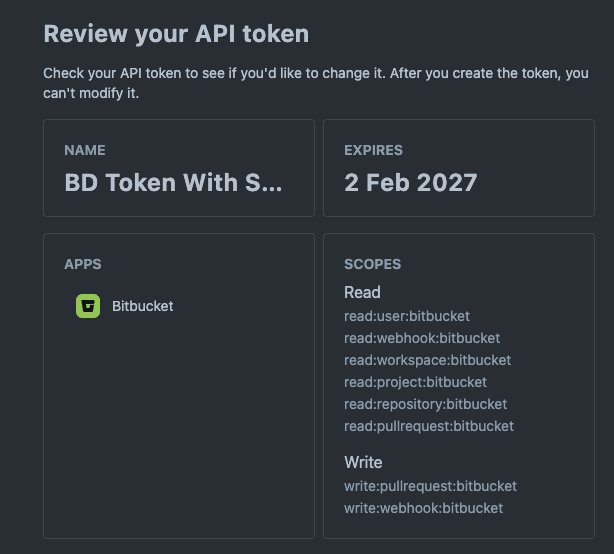
Select the scopes:
read:user:bitbucketread:webhook:bitbucketread:workspace:bitbucketread:project:bitbucketread:repository:bitbucketread:pullrequest:bitbucketwrite:pullrequest:bitbucketwrite:webhook:bitbucket
Next Steps
Use this token to connect to Polaris:
After the connection is established:
- Synchronizing Polaris with your SCM Provider
- Event-Based Test Automation in Polaris for SCM Integrations
You can also scan on demand (see How to test from the web UI) or schedule automatic testing on a daily or weekly basis (see Test scheduling policies).
Note: From the Tests screen, before beginning a test manually, make sure to test the connection.